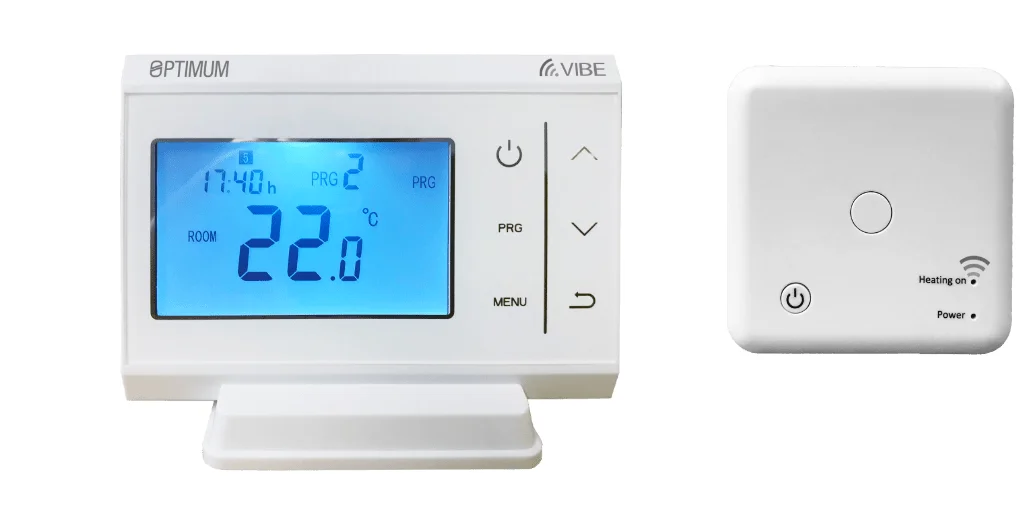
OP‑WFSTAT Wi‑Fi Digital Room Thermostat — a practical wireless stat for single‑zone homes
July 29, 2026The OP‑WFSTAT is a paired room thermostat system comprising a battery‑powered touchscreen transmitter and a mains‑powered receiver that connects beside the boiler. It aims to sit between basic programmable stats and larger smart ecosystems: you get a clear on‑device interface for everyday control plus remote access through the Smart Life app. The unit also provides both a volt‑free relay and OpenTherm terminals, so it can either operate a conventional on/off boiler or ask an OpenTherm‑capable boiler to modulate.
What kind of installation is this built for?
This product is designed for single‑zone domestic heating installations. The transmitter (the wall stat) runs from two AAA alkaline cells and communicates wirelessly to a small receiver that must be powered from the 230 V AC supply and located close to the boiler. The receiver then provides the actual boiler interface: a volt‑free COM/NO contact for standard switching or OpenTherm terminals for modulation where the boiler supports it.
Because the receiver is a small, low‑current device with a 10 A resistive rating, it is suitable for directly switching the majority of domestic boilers. However, it is not intended for switching high current loads such as pumps or multiple heating zones without an intermediate relay or contractor. Installers should check the boiler wiring diagram and the receiver wiring guide before fitting.
Who will get on well with the OP‑WFSTAT?
- Households wanting a straightforward upgrade from a mechanical stat or basic digital stat to a programmable, remotely controllable unit without moving into a subscription smart platform.
- Homes with a single heating zone where simple weekday/weekend scheduling and four daily temperature periods are adequate.
- Installations with an OpenTherm‑compatible boiler where modulation can improve comfort and efficiency — provided the installer confirms OpenTherm support and wires it correctly.
- Anyone who prefers a touchscreen wall stat for local control but still wants the convenience of remote app access.
Who should look elsewhere?
- Properties with multi‑zone heating setups that need several thermostats coordinated through a central hub or multi‑zone controller.
- Installations requiring high‑current switching directly from the receiver (for instance, switching pumps or high‑load actuators) without an intermediate contactor.
- Users whose routers are 5 GHz‑only or who require dual‑band Wi‑Fi support: the OP‑WFSTAT only uses 2.4 GHz for app connectivity.
- Owners who expect an advanced, commercial‑grade building management feature set or ongoing cloud functionality with guaranteed long‑term firmware updates; the device relies on the Smart Life app for remote features and typical manufacturer support patterns for such products apply.
Everyday use and practical ownership scenarios
The transmitter offers a simple weekly schedule with a 5+2 weekday/weekend option and four temperature periods per day. That arrangement will suit many families who want distinct morning and evening comfort periods and a cooler day‑time setback.
Three temperature regulation modes are provided: basic ON/OFF control, an Optimising (optimum start) mode that shifts start times to reach the set temperature when required, and T.P.I. (time‑proportional/integral) which can give finer control on systems that respond better to short cycling. There is also a frost‑protection setting adjustable within a modest range. These options allow the thermostat to be tailored to different boiler behaviours and property thermal inertia — for example, a well‑insulated modern home may benefit from a tighter T.P.I. setting, whereas an older property with slow radiators might be better served by Optimising.
With the Smart Life app, remote actions such as temporary boosts, holiday mode and on/off control are available when the transmitter is connected to the household 2.4 GHz Wi‑Fi. That gives useful remote access for families who travel or want to turn heating on before arriving home — though the experience and feature set depend on the app and any firmware the vendor provides.
Compatibility and installation considerations
Key points for installers and competent DIYers:
- The receiver must be wired to a 230 V AC supply and mounted near the boiler. It exposes both volt‑free relay terminals (COM/NO) and separate OpenTherm terminals.
- OpenTherm support is conditional: the receiver will attempt auto‑recognition, but OpenTherm will only work if the boiler supports the protocol and the wiring matches the boiler manufacturer’s guidance. Confirm boiler compatibility before selecting OpenTherm over simple relay switching.
- Do not wire the volt‑free relay into live mains L/N on the receiver; follow the wiring diagram carefully and take standard isolation and earthing precautions before working on the boiler circuit.
- The receiver’s switching is rated at 10 A resistive @ 230 V — suitable for most domestic applications but not for directly switching heavy loads. Use an appropriate relay or contactor where necessary.
- Wireless: the transmitter uses an 868 MHz license‑free RF link pre‑paired at the factory for the local stat–receiver connection. For app features, the transmitter requires the home’s 2.4 GHz Wi‑Fi (it does not support 5 GHz bands), so ensure the property’s network provides a 2.4 GHz SSID in the area where the stat will be installed.
Strengths you can rely on
Practical advantages of the OP‑WFSTAT include a clean touchscreen interface for everyday control, straightforward local scheduling and remote access through a widely used third‑party app. The optional OpenTherm terminals mean installations with compatible boilers can take advantage of modulation — a real benefit for improving boiler efficiency and achieving steadier room temperatures compared with on/off cycling.
Factory pre‑linking of the RF connection typically simplifies commissioning of the wireless stat, and the receiver’s small footprint helps with neat installation beside most boilers. The presence of a manual override button on the receiver is a sensible backup for local control during commissioning or where Wi‑Fi is unavailable.
Limitations and trade‑offs to weigh up
- App dependency: remote features rely on the Smart Life app. While this is a common choice for many smart devices, the depth of integration and longevity of cloud features depend on the app provider’s policies and ongoing firmware support.
- 2.4 GHz only: the lack of 5 GHz support means the stat won’t work with networks that are 5 GHz‑only without a 2.4 GHz SSID. In multi‑ap homes, ensure the wall stat is in range of the 2.4 GHz network.
- Basic scheduling granularity: four periods per day with a 5+2 grouping will suit most homes, but users who want more complex occupancy patterns or per‑hour control may find the scheduling too limited.
- Load rating: the receiver’s 10 A resistive limit requires additional equipment when controlling larger loads, which adds cost and installation complexity compared with higher‑rated controllers.
- No multi‑zone hub: this product is focused on single‑zone control. For multi‑room systems, choose a product designed for multiple thermostats coordinated by a central controller or smart hub.
Maintenance, support and long‑term ownership
Routine maintenance is modest. The transmitter uses two AAA alkaline cells, so owners should expect to replace batteries periodically depending on use; keeping spare cells handy is sensible. The receiver is mains‑powered and generally maintenance‑free, though installers should ensure the enclosure remains dry and dust‑free and that connections are checked during boiler servicing.
Software and cloud considerations matter more for remote features. The Smart Life app provides the remote interface; continued access to remote control and any future features depends on the app provider’s services and the vendor’s firmware updates. Buyers who value guaranteed long‑term cloud support or local‑only control without third‑party servers should check the vendor’s support policy before purchase.
For fault diagnosis, the receiver’s indicator LEDs and manual override button are useful. However, because the device bridges wireless, app and boiler interfaces, troubleshooting can involve network, app and wiring aspects. Installers should be prepared for this mixed‑discipline approach and leave clear notes for owners about Wi‑Fi credentials, battery access and how to use the manual override.
Value and buying considerations
The OP‑WFSTAT occupies a practical mid‑range position: it provides more capability than a basic programmable stat through app control and OpenTherm support, yet it avoids the complexity and expense of an entire smart heating ecosystem. Prospective buyers should weigh a few points:
- Confirm boiler compatibility with OpenTherm before relying on modulation advantages; otherwise it will operate as a volt‑free relay thermostat.
- Factor in any extra hardware needed for high loads (contactors/relays) or for multi‑zone setups since this product is single‑zone focused.
- Check that the property’s Wi‑Fi includes a reliable 2.4 GHz network in the stat’s intended location.
- Consider whether the Smart Life app’s features meet your expectations for remote control, and whether you accept reliance on an app/cloud service for remote access.
Realistic scenarios where this product fits well
Example 1: a typical semi‑detached house with a single heating zone and an OpenTherm‑capable combi boiler. The OP‑WFSTAT can replace an old mechanical stat, provide a clear daily schedule, enable modulation for steadier temperatures and allow remote switching from a phone before returning home.
Example 2: a flat with a conventional on/off boiler and a desire for simple app control. The stat provides remote on/off and temporary boost from the Smart Life app, while the volt‑free relay operates the boiler in the conventional way; the installer uses a small contactor if the boiler’s control circuit requires one.
Final balance
The OP‑WFSTAT is a sensible, no‑nonsense choice for single‑zone homes that want a combination of easy local control and basic smart features. Its strengths lie in the tidy touchscreen interface, simple weekly scheduling, and the optional OpenTherm connection that adds value for compatible boilers. Practical limits — single‑zone focus, 2.4 GHz‑only Wi‑Fi, a 10 A resistive switching limit and reliance on a third‑party app for cloud features — are important to recognise before buying.
If you need a straightforward, installer‑friendly upgrade from a basic thermostat, and your boiler and wiring suit the product’s outputs, the OP‑WFSTAT is a practical option. For multi‑zone systems, high‑current switching or users who need advanced scheduling and guaranteed long‑term cloud support, look for a system designed specifically for those requirements.
Latest product offer
Ready to check OP-WFSTAT Wi-Fi Digital Room Thermostat?
Check the latest product page, price and offer details before buying.