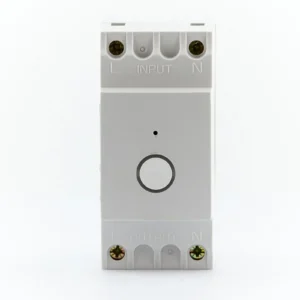
OP-DRWF01 Wi‑Fi DIN‑Rail Timer — a compact concealed scheduler for single mains circuits
July 27, 2026The OP‑DRWF01 is a compact DIN‑rail timeswitch that brings remote scheduling and voice assistant control to a single mains output. It’s designed to sit inside a consumer unit or electrical enclosure on a standard 35 mm rail and is controlled through a vendor smartphone app using a 2.4 GHz Wi‑Fi connection. The unit offers internet‑synchronised timekeeping, up to 15 on/off programmes, minute‑level resolution and a simple on‑device override.
When this makes sense — realistic ownership scenarios
This module is well suited to situations where you want a neat, hidden control for one mains circuit without adding a separate wall controller or running extra control wiring. Typical uses include automating an immersion heater via its relay, switching a small pump or fan, or controlling a lighting circuit that doesn’t need multi‑channel control or energy monitoring. Because it mounts on a DIN rail it keeps wiring tidy and avoids visible timers in living spaces.
Think of it as a low‑complexity retrofit: if your goal is to add timed switching and occasional remote overrides to a single circuit in an existing distribution board, the OP‑DRWF01 is a straightforward option. It’s a reasonable choice for landlords, small commercial premises with simple needs, or homeowners wanting smart scheduling for specific loads without replacing a boiler control or introducing room thermostats.
Who should avoid it
There are clear limits to what this unit was designed to do. It is single‑channel only — so if you need to control multiple circuits (rooms, zones or several pieces of equipment) you’ll need additional devices or a multi‑channel system.
- Do not use it as a direct motor starter for heavy inductive loads: the inductive rating is 4 A (cos φ 0.6). Motors, compressors and pumps with significant inrush currents typically need a contactor or starter sized for the motor; use the timeswitch to operate that contactor rather than switching the motor load directly.
- It is IP20 and intended for indoor, in‑board installation. If you need an outdoor or wet‑location device you must mount this inside a suitable enclosure rated for the environment.
- If you require volt‑free (dry) contacts for integration with legacy control systems, note that the OP‑DRWF01 switches mains live — it is not a dry‑contact relay without additional wiring or an intermediary relay.
- It relies on 2.4 GHz Wi‑Fi. Sites that are Wi‑Fi‑free, use only 5 GHz networks, have restricted guest networks or segregated subnets for security may require network configuration or a different product with alternative comms (Ethernet, wired control bus or Zigbee/Z‑Wave).
Installation and setup — what to expect
Physically, the unit clips to a standard 35 mm DIN rail and should be wired inside the enclosure to the live and neutral of the controlled circuit. The manufacturer documentation shows a simple L and N in, and live out to the load arrangement: the module switches the live conductor. Because it switches mains, wiring must be performed by a competent electrician in accordance with local regulations.
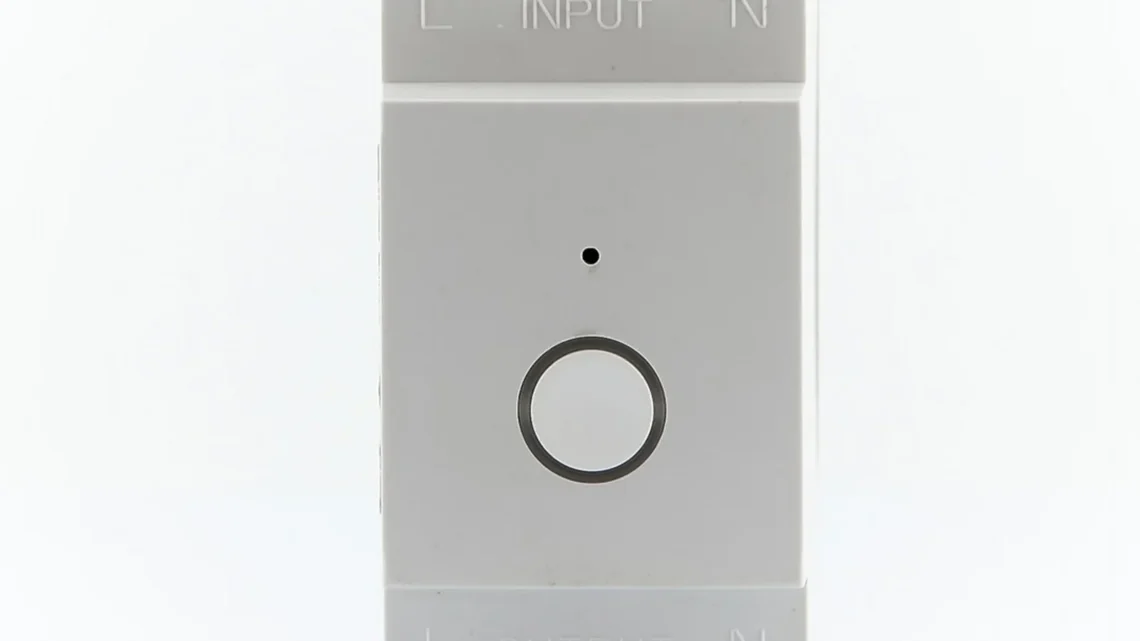
Timekeeping is kept accurate by synchronising to internet time via the smartphone app and the module’s cloud service — you don’t have to rely on an internal quartz only. Programming is done through the vendor app on iOS or Android. The app provides 24‑hour and 7‑day schedules, countdown and random functions, repeat cycles and up to 15 on/off programmes. An on‑device button offers a manual toggle through On, Timed (automatic) and Off modes for quick local control.
Practical setup tips based on the product’s design:
- Ensure your installer has access to the router SSID and password for the 2.4 GHz band during pairing. Some routers broadcast separate SSIDs for 2.4 and 5 GHz; the module won’t see 5 GHz.
- If the distribution board sits in a location with poor Wi‑Fi coverage (meter cupboard, basement), check signal strength before committing to an install. A Wi‑Fi plug‑in extender that creates a stable 2.4 GHz network in the cupboard can often be used, but this is a site decision for the installer.
- Leave some clearance on the DIN rail for heat dissipation and for ease of removal. Although power consumption is low (around 1 VA), adjacent heat‑producing modules should be avoided where possible.
- Because the module switches mains live, label the circuit and note the lack of volt‑free contacts if the installation ties into other control systems.
Compatibility and smart‑home links
Connectivity is Wi‑Fi only (WLAN 802.11 b/g/n on 2.4 GHz). The device supports remote control through the smartphone app, which in turn provides links to Amazon Alexa and Google Home for basic voice control once the module is online and paired. There is no Ethernet, Zigbee or Z‑Wave option and no built‑in energy metering.
For integration with third‑party automation platforms, you should confirm the vendor app’s capabilities before buying. The product literature indicates Alexa and Google compatibility, but if you rely on advanced routines, scene triggers or local network automation you’ll need to check how the vendor app exposes the device to these ecosystems (for example whether it supports routines or only basic on/off commands through the voice assistant).
Electrical ratings and practical consequences
The OP‑DRWF01 is rated for 220–240 V AC operation and lists a resistive switching capacity of 16 A and an inductive rating of 4 A (cos φ 0.6). Translated to practical terms:
- Resistive loads such as electric heaters, immersion elements and many incandescent or resistive LED drivers are within the module’s 16 A rating, assuming the connected circuit does not exceed that current.
- Inductive loads — motors, compressors, some pump types and transformers — present a greater switching challenge because of inrush currents. The 4 A inductive rating means the module will handle small inductive devices, but larger motors and compressors should be switched via a dedicated, appropriately rated contactor. Using the timeswitch to operate the contactor coil is the correct approach for heavier inductive loads.
- The device is Class II (double insulated) and IP20; it does not provide ingress protection against moisture or dust, so it is intended for indoor, enclosed installations only.
In short: check the steady running current and the inrush of the load. If in doubt about a pump or motor, size a contactor for the motor and use the OP‑DRWF01 to drive that contactor coil.
What it does well
The strengths of the OP‑DRWF01 are straightforward and practical:
- Concealed installation: mounting on a DIN rail keeps the timer out of sight and near the controlled circuit, which is ideal for retrofits and cleaner panels.
- Remote scheduling and internet time synchronisation remove the need to correct drift or manually adjust clocks after power loss (assuming the network/cloud service is available).
- Minute resolution and up to 15 programmes provide adequate flexibility for most domestic tasks, from short boost periods to weekly schedules.
- Integration with common voice assistants offers simple remote control without always needing the smartphone app.
Compromises and realistic limitations
There are compromises that follow directly from the product’s compact, low‑cost design:
- Single channel only — you’ll need multiple units to control more than one circuit, which can clutter a DIN rail and requires separate app entries unless the vendor supports grouping.
- No volt‑free contacts — impacts integration if you must provide a dry contact to an existing control circuit or third‑party device.
- Dependence on cloud/app for features — while basic timed behaviour is stored locally once programmed, remote access and voice assistant links rely on the vendor’s network and app availability. If you prefer systems that continue to operate entirely locally without cloud dependencies, consider alternatives with local control or hardwired timers.
- Not suitable for direct switching of high inductive loads — as noted, larger pumps and motors need a contactor.
Maintenance, support and longevity considerations
Maintenance is minimal: the unit has no moving mechanical time wheels or consumable parts and the quoted operating temperature range is typical for electrical enclosure environments. As with any mains device, inspect connections at installation and during periodic electrical maintenance to ensure terminals remain tight and free of corrosion.
Long‑term ownership considerations tend to centre on software and network support. The hardware will continue to function as a timer for many years, but cloud‑based features such as remote access or voice assistant integration depend on continued support from the vendor (app updates and cloud servers). When choosing any smart device, consider how critical remote features are to your setup and whether losing app support would materially affect operation. For mission‑critical installations, rely on local fail‑safe arrangements: for instance, ensure the controlled equipment has manual overrides or is also controllable from a local isolation point.
Buying considerations and value
Value is a balance between what the module offers and what you need. The OP‑DRWF01 delivers a tidy, low‑cost route to add timer scheduling, app control and voice operation to a single in‑board circuit. If you want a single discreet timer that mounts inside a board and you don’t need multi‑channel control, power metering or volt‑free contacts, this is a practical option.
Consider the installation context to judge true value:
- If your intended load is resistive and under 16 A, the unit removes the need for external timers and keeps the control concealed.
- If your load is inductive and small enough to fall under the 4 A rating, you can use it directly; for larger inductive loads the cost of a small contactor plus the timeswitch is the correct, safer solution — factor that into the overall price comparison.
- If you expect to expand automation significantly, buy with an eye to the broader ecosystem: does the app support multiple devices and grouping? Will adding several identical units create management overhead that outweighs buying a multi‑channel solution?
Simple examples of realistic installs
Example 1 — Immersion control: In a property where an immersion heater is controlled via a relay in the consumer unit, the OP‑DRWF01 can replace a mechanical timer and add remote scheduling. The communication requirement is modest (2.4 GHz Wi‑Fi), and the immersion element is a resistive load typically within the 16 A rating. Make sure the installer confirms the immersion’s element current and protects the circuit with suitable breakers.
Example 2 — Small circulation pump: For a domestic heating pump with low steady current and low inrush, the module may directly switch the pump if the motor current is within the inductive rating. More commonly, pumps have higher inrush and should be switched through a contactor. The OP‑DRWF01 then controls the contactor coil, which keeps the plugin timer small and safe while allowing it to manage larger loads indirectly.
Example 3 — Concealed lighting control: A small lighting circuit inside a cupboard or garage that needs timed control can be switched directly by this module, provided the total lighting load is within the resistive rating and the enclosure remains dry and vented.
Summary and recommendation
The OP‑DRWF01 is a compact and sensible solution when you need a single concealed timeswitch with app and voice control for domestic or light commercial use. Its straightforward wiring and DIN‑rail form factor make it convenient for retrofits and for keeping the control inside an electrical enclosure. The main technical caveats are its single‑channel nature, its reliance on 2.4 GHz Wi‑Fi and the relatively low inductive switching capacity — factors that limit direct switching of motors and larger pumps.
Choose this unit if you want tidy in‑board scheduling for resistive loads or if you plan to trigger a suitably rated contactor for larger inductive equipment. Avoid it if you need volt‑free contacts, multi‑channel control from a single module, outdoor mounting without an enclosure, or if you require guaranteed cloud‑less local automation. As with any mains switching device, have a qualified electrician carry out the installation and confirm load characteristics before committing to direct switching.
Latest product offer
Ready to check OP-DRWF01 Wi-Fi DIN Rail Timer?
Check the latest product page, price and offer details before buying.